
-80%
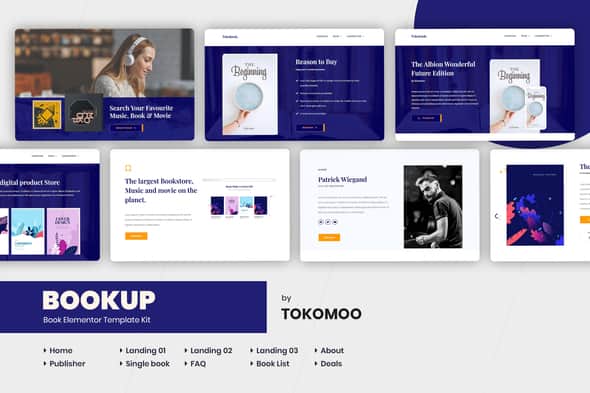
Bookup | Book Store Elementor Template Kit


Original price was: $24.00.$4.80Current price is: $4.80.
Bookup is a modern Elementor Template Kit that is perfect for creating a website for Book Publisher, Book Author, Publishing Company, Stationary, Book Store, Magazine, or Author website. This template has a Unique and Professional design with a 100% responsive layout, retina-ready, and easy to customize.
10+ Different Pages For Your Book Website, Every page comes with multiple layouts and useful features to give you more options in customization. Available 20+ Extra Block Templates For Elementor.
NOTES:
- This is not wordpress theme, it is Elementor template kits.
- What is the Elementor Template Kits? The Elementor Template Kits is a library which contains over 10 pre-designed page templates, as well as templates that were saved by the user. The Library allows you to quickly create designed pages and customize them to be your own, saving you from building all pages from scratch.
DEMO PAGES
- Homepage
- Landingpage 01
- Landingpage 02
- Landingpage 03
- Store Page
- Book Publisher Page
- Single Book Page
- Single Video Page
- Single KC Page
- Grid List Page
- Deals Page
EXTRA ELEMENTOR SECTIONS / BLOCKS
- 3 About Blocks
- 4 Call To Action Blocks
- 2 Clients Blocks
- 5 Features Blocks
- 1 Footer Block
- 1 Header Block
- 6 Hero Blocks
- 1 Logo Grid Block
- 4 Other Blocks
- 6 Portfolio Blocks
- 2 Product Blocks
- 2 Services Blocks
- 3 Testimonial Blocks
ELEMENTOR PRO THEME BUILDER
- 1 Header Template For Theme Builder
- 1 Footer Template For Theme Builder
MORE ELEMENTOR PRO TEMPLATES IS ON PROGRESS…
How to Import Template Kit
- Install the plugin from Plugins > Add New by searching for Template Kit Import.
- If you must use FTP to install plugins, you can download it from
- Once the plugin is activated, go to Tools > Template Kit
- Click on Upload Template Kit ZIP file to browse to your zip file and import.
- Your Template Kit preview will appear. Click View Installed Kit
- An orange banner will appear if your kit requires additional free plugins. Click Install Requirements for details.
- A popup will appear listing the plugins your kit needs installed or activated. Click Install Requirements to proceed.
- Now you may begin importing your templates by clicking the Import Template button on the desired template.
- Avoid clicking too many at once. Your browser can typically only handle up to 3-4 at a time.
- Import Global Kit Styles first, followed by any other Global templates for best results.
for more information please read the official documentation from envato:
This Template Kit uses demo images from Envato Elements. You will need to license these images from Envato Elements to use them on your website, or you can substitute them with your own.
Related products
-80%

Original price was: $24.00.$4.80Current price is: $4.80.
-80%

Original price was: $24.00.$4.80Current price is: $4.80.
-80%

Original price was: $24.00.$4.80Current price is: $4.80.
-80%

Original price was: $29.00.$5.80Current price is: $5.80.
-80%

Original price was: $24.00.$4.80Current price is: $4.80.
-80%

Original price was: $24.00.$4.80Current price is: $4.80.
-80%

Original price was: $24.00.$4.80Current price is: $4.80.
-80%

Original price was: $29.00.$5.80Current price is: $5.80.